Installing and securing the platform
The PDQ platform is deployed as a modular set of Docker containers, with a strictly defined startup sequence and centralised metadata control through the Active Metadata Engine (AME). There is no PDQ-specific runtime underneath it: anything that can run containers can run the platform.
The core tools deployed are AME, INGEST, DLS and DWA, along with the Config UI and Caddy.
Where each component belongs
Deployment is about efficiency and decentralisation where it pays:
- INGEST agents are preferably deployed close to the data source — on-premises or in a separate cloud — to minimise data transmission.
- DWA is ideally located in the same region as the target database.
- AME and DLS run as close to each other as possible, in the same region as the repository database.
Deployment prerequisites and infrastructure setup
System requirements
| Minimum | Recommended | |
|---|---|---|
| Docker Engine | 20.10+ | 24.0+ |
| RAM | 8 GB | 16 GB |
| CPU | 4 cores | 8 cores |
| Storage | 100 GB | 500 GB |
| Database | Shared | Dedicated instance (SQL Server, PostgreSQL or another supported engine) |
Verify the host before you start:
docker --version
docker compose version
VM and core dependencies
Deployment typically begins on a VM — an EC2 Ubuntu 22.04 instance is the reference platform — prepared as follows:
- Disk setup: Create and mount an extra disk (for example
/datadrive), usingmklabel gptandmkfs.xfs. This disk holds the Docker data root. - Docker installation: Install the Docker engine, CLI, containerd.io and the required plugins.
- Data root and logging: Edit or create
/etc/docker/daemon.jsonto define the data root ("data-root": "/datadrive/docker") and configure rotating logs ("max-size": "10m","max-file": "3").
Service orchestration and startup order
The components are managed by systemd service files enforcing a strict, linear dependency chain through Requires= and After= directives, so a service starts only if the one before it succeeded.
The required startup order is:
simplitics-ui.service(base service, requires only Docker)simplitics-ame.service(Active Metadata Engine — starts after UI)simplitics-dls.service(Data Lake Service — starts after AME)simplitics-dwa.service(Data Warehouse Automation — starts after DLS)simplitics-ingest.service(Data Importer — starts after DWA)
To start the whole stack, enable and start only the last service in the chain (simplitics-ingest.service).
1. Active Metadata Engine (AME)
- Security isolation: No component may publish a mapped port. Remove every port mapping from the Compose files —
ame-compose.ymlincluded — so that all services sit on the internal Docker network and only Caddy is exposed. See Network exposure below. - API communication: AME is the central API hub, serving all configuration and instructions to INGEST, DLS and DWA.
2. INGEST (Data Importer)
- Deployment model: INGEST runs as a container, one per source connection, and operates as an agent that can be deployed anywhere — it needs only an API connection back to AME.
- Container start: Initiated with the source system name as a runtime parameter, for example
command: -n <SOURCESYSTEMNAME> -f teams.yaml. - Teams/API integration: Requires an Azure AD app registration, client secrets, and the AME connection configured through
/api/v3/ingest/connection/for/:sourceSystemwithAPIAuthMethodset to"OAuth 2.0".
An INGEST SFTP source auto-accepts the host key, so the server's identity is not checked. Restrict the network path to the SFTP host, and do not rely on the transport alone to tell you which machine answered. See Configuring ingestion.
3. DLS (Data Lake Service)
- Container scaling: DLS runs as several containers — a minimum of six — using workers that scale with available capacity.
- Functionality deployment: Configuration (file structure,
rawZonePath,targetMethod) is deployed through API calls to AME at/api/v3.2/sourcefiles/:sourceFilename. - Streaming configuration: High-performance streaming for large XML/JSON files is enabled by setting
useForSplittingRecordsto1on a hierarchy level, through a backend API update.
4. DWA (Data Warehouse Automation)
- Deployment location: DWA runs as several containers — a minimum of four — preferably in the same region as the target database.
- Configuration: Relies on three metadata inputs, submitted through the API or the Config UI:
- Target model definitions (objects, keys, relations)
- Source description (from DLS)
- Source-to-target mappings (LOGIC), including attributes and filtering
- Orchestration: DWA uses APIs to describe the source, create a runtime schedule, and log progress.
Post-installation configuration
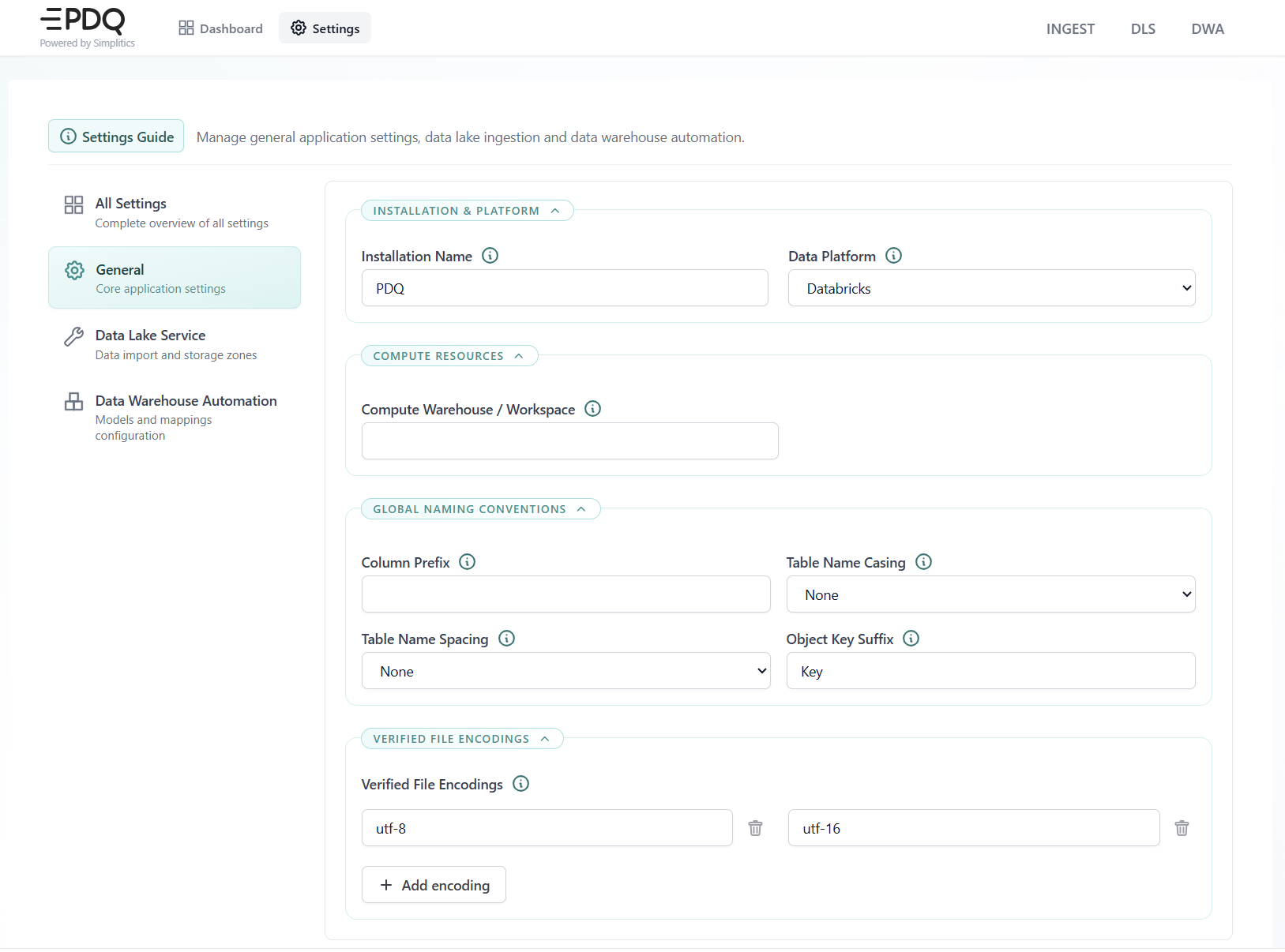
Once the stack is running, open Settings in the Config UI and set the installation-wide values before the first load:
- Installation name and Data platform — the target engine the SQL generator writes for (Snowflake, Databricks, SQL Server, Synapse, Fabric or PostgreSQL).
- Compute warehouse / workspace — the compute the platform runs against.
- Global naming conventions — column prefix, table name casing, table name spacing and object key suffix. These are applied by the SQL generator to every generated object, so set them before generating target tables.
- Verified file encodings — the encodings DLS accepts for incoming source files.
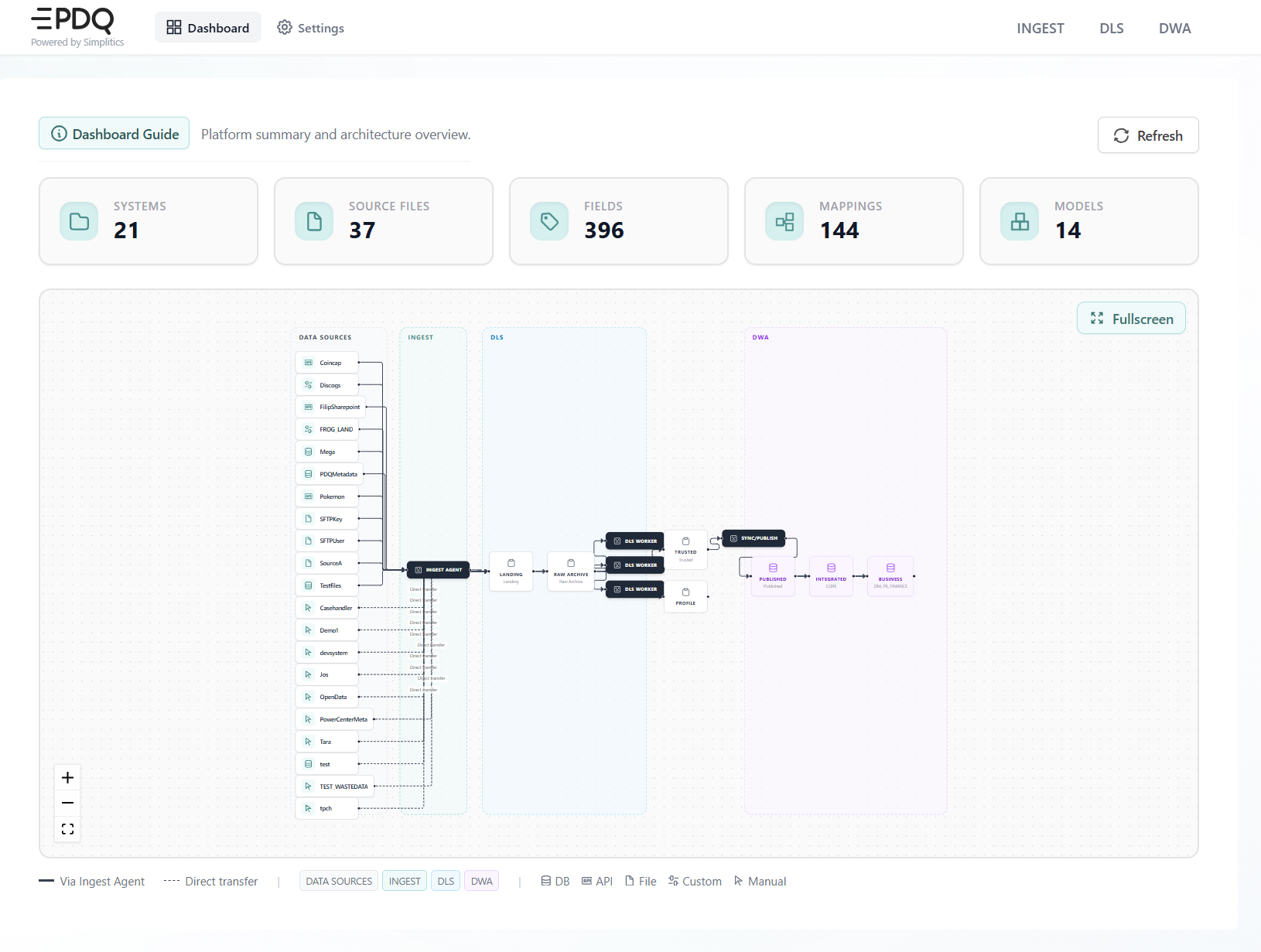
The Dashboard confirms that the stack is up and reachable: it counts the configured systems, source files, fields, mappings and models, and draws the end-to-end flow across INGEST, DLS and DWA.
Security and access
Caddy fronts the platform, handling TLS termination, API access and the login flow.
Network exposure
Only port 443 is open, and only on Caddy. No other port is exposed, on any component.
- DNS: The PDQ machine must use a Fully Qualified Domain Name (FQDN).
- Firewall: Port 443 must be accessible on the server, but only from within the customer's environment — not publicly.
- Network: Create a new Docker network, for example
xx_caddynet. - Port mappings: Every mapped port must be removed from every component's Compose file. The components talk to each other over the internal Docker network; nothing but Caddy answers from outside.
Entra (Azure AD) authentication
- App registration — create an app registration (for example
sp-pdq-caddy-demo) with a redirect URI carrying the FQDN and HTTPS port:https://{dns_name}:{port}/auth/oauth2/azure/authorization-code-callback. - Group claims — define three Entra groups (
pdq_web_admins,pdq_web_developers,pdq_web_viewers) and update the token configuration to emit the user's assigned groups as a group claim. - Permissions — grant admin consent for
User.ReadandGroupMember.Read.All.
Role mapping
The installer maps roles at installation time, by setting the GUID of the Entra group as the value of each internal group — authp/admin and authp/user.
The roles span two interfaces, which the console's own role table does not make clear on its own:
| Role | Config UI | DataOps Console |
|---|---|---|
admin | Write | Everything, including restart, skip, trigger and editing |
developer | Write | Read only — no admin actions |
reader | No write access | Read only |
A developer therefore has full write access where the platform is configured, and no ability to intervene in a running load. A reader cannot write anywhere.
Maintenance and upgrades
- General troubleshooting: The common resolution for infrastructure problems, such as a VM crash, is to stop and start the virtual machine from the cloud portal.
- Container restart: If issues persist, navigate to
/datadrive/configsand rundocker compose downfollowed bydocker compose up -dfor all components (AME, UI, DLS, DWA, INGEST, TOOLS). - Upgrades: Stop all Docker services first. Update the component Compose files to point at the image tag for the release you are upgrading to — the product version, for example
3.2. Date-based numbers such as25.6.1are not product versions. Then perform a manual pull to fetch the new images.
Credentials after an upgrade
After an upgrade, open each connection and save it again.
A stored credential is never reused, so passwords, keys and any client_secret have to be entered again on every save — see Credentials. There is no re-encryption routine, and there is nothing to recover: secrets are never stored unencrypted.
Retrieving a connection and posting it back does not re-encrypt it. It encrypts the already-encrypted value a second time and leaves a working connection unusable.
The Show JSON preview renders the connection as it will be sent, secrets included. Treat a downloaded copy as a credential.