Ingest
This section provides guidance on configuring connections, exporting data, automating data extraction, and understanding the technical specifications of the INGEST component.
What you will learn about here:
Connections: How to configure a connection to a source system on the INGEST → Connections page of the Config UI. This includes registering a new source system, choosing the connection type and operator, applying a configuration preset, and entering credentials.
Exports: How to configure an export definition on the INGEST → Exports page. An export reads one table, endpoint, directory or queue and writes the result to the landing zone.
Code Setup: A guide for automating data extraction and loading into the landing zone on a scheduled basis when using the UI isn't feasible. This section covers the JSON definitions and the API endpoints they are posted to.
Technical Details: Detailed information about the technical specifications of the INGEST component, including container setup, Python dependencies, and deployment and execution guidelines.
Each heading above is a tab at the top of the page, not a section you can scroll to. The table of contents and any deep link only reach the tab that is open, so switch tabs rather than searching the page.
- Connections
- Exports
- Code Setup
- Technical Details
Configuring the connection in the Config UI
The INGEST → Connections page (/systems) defines how PDQ reaches a source system. Systems are listed in the searchable sidebar on the left; selecting one opens its connection, and Add new system creates a new one.
Each page carries a Connections Guide button at the top that expands a short in-app summary of the same material.
Adding a new system
A system is the logical source that everything else hangs off — connections, exports, source files and mappings all reference it by name.
Source system name (system): A unique, one-word name representing the source system. This name is used internally for tracing and managing data from this source system, and cannot be changed later.
Source system description (description): A written textual explanation of the context and details of the source system. This description is shown throughout the system documentation.
Choosing a connection type
- DB — a relational database reached with SQL.
- API — an HTTP endpoint returning JSON.
- FILE — a file system: local disk, S3, Azure Data Lake Gen2 or SFTP.
- CUSTOM — everything else. Today this is the message-queue family (SQS, Azure Service Bus, Redis) plus the plain custom template.
A system that has no connection yet shows the four connection types as buttons. The type decides which contract the connection is stored under and which form you get:
Once a connection exists, the type is fixed and the header shows the operator and a Connected badge instead.
Choosing the operator
Within a connection type, the ingest runtime runs exactly one operator class per source system. The operator decides which fields are read, which are required, and which are ignored — so the form asks only for what that operator needs, marks what it requires, and flags what it will ignore rather than hiding it.
| Type | Operators |
|---|---|
| DB | PostgreSQL, SQL Server, Oracle, MySQL, and a generic base class |
| API | Generic REST, Heartpace, Salesforce Service Cloud, Talkdesk, SharePoint (Graph), Microsoft Teams, Google Drive / Sheets |
| FILE | Local file system, Amazon S3, Azure Data Lake Gen2, SFTP |
| CUSTOM | AWS SQS, Azure Service Bus, Redis, and a custom template |
Where the choice is stored. Only two connection kinds can record their operator:
| Type | Stored in | Who wins |
|---|---|---|
| FILE | the StorageType field | the saved connection |
| CUSTOM (queues) | the queue_type connection property | the saved connection |
| DB | nowhere — it lives in the agent's settings.yaml | detected from the port, overridable per browser |
| API | nowhere — as above | detected from the API URL, overridable per browser |
For DB and API the picker says how it arrived at its answer — detected from the port or the URL, or remembered from an earlier choice in this browser — rather than presenting a guess as fact. The choice only tailors the form; it is not sent anywhere.
A handful of operators written for a single customer's source are not offered in the picker, but a system already mapped to one is still recognised and gets the right form.
Database operators

API operators

File operators

Custom operators

Configuration presets
- Fill empty fields writes only where the form is blank, so applying a preset can never overwrite something you typed.
- Reset to these values is a separate action for the "start over from the defaults" case.
- A preset never contains a password, secret or key, and never invents a value it cannot know. Anything of that kind appears on the "still needed" checklist instead.
Most of what a new connection needs is identical for every customer of a given source: the port, the delimiters, the grant type, the control headers, the scope. Picking an operator offers one or more presets that fill those in, then list what they deliberately left to you with a note on where to find each value.
Presets exist for PostgreSQL, SQL Server, Oracle and MySQL; for OAuth 2.0 client credentials, OAuth with a client certificate and static bearer tokens on the generic REST operator; for Talkdesk, Salesforce (password and client-credentials grants), SharePoint and Teams via Graph; and for S3, SFTP (password and private key), Azure Data Lake Gen2 and the local file system.
Credentials — read this before saving
- a stored credential comes back encrypted, and there is no way to read the original back;
- posting that encrypted value back would encrypt it a second time;
- the connection then fails at the next export, with nothing in the UI to show why — the value looks unchanged because it is unchanged, just wrapped one layer deeper than the runtime expects.
The API encrypts every value it receives. Everything else follows from that one fact:
So a stored credential is never reused. Saving a connection means entering the real credential again, and whatever you enter becomes what is stored. This applies to database and storage passwords and to encrypted values inside the connection properties — an OAuth client_secret, for instance, is cleared when the connection loads, and the form tells you which values it cleared.
The Show JSON preview always includes the password key so the payload is postable, but never fills it with the stored value. A downloaded preview contains a live credential whenever one was typed — treat it as a secret, not a config file.
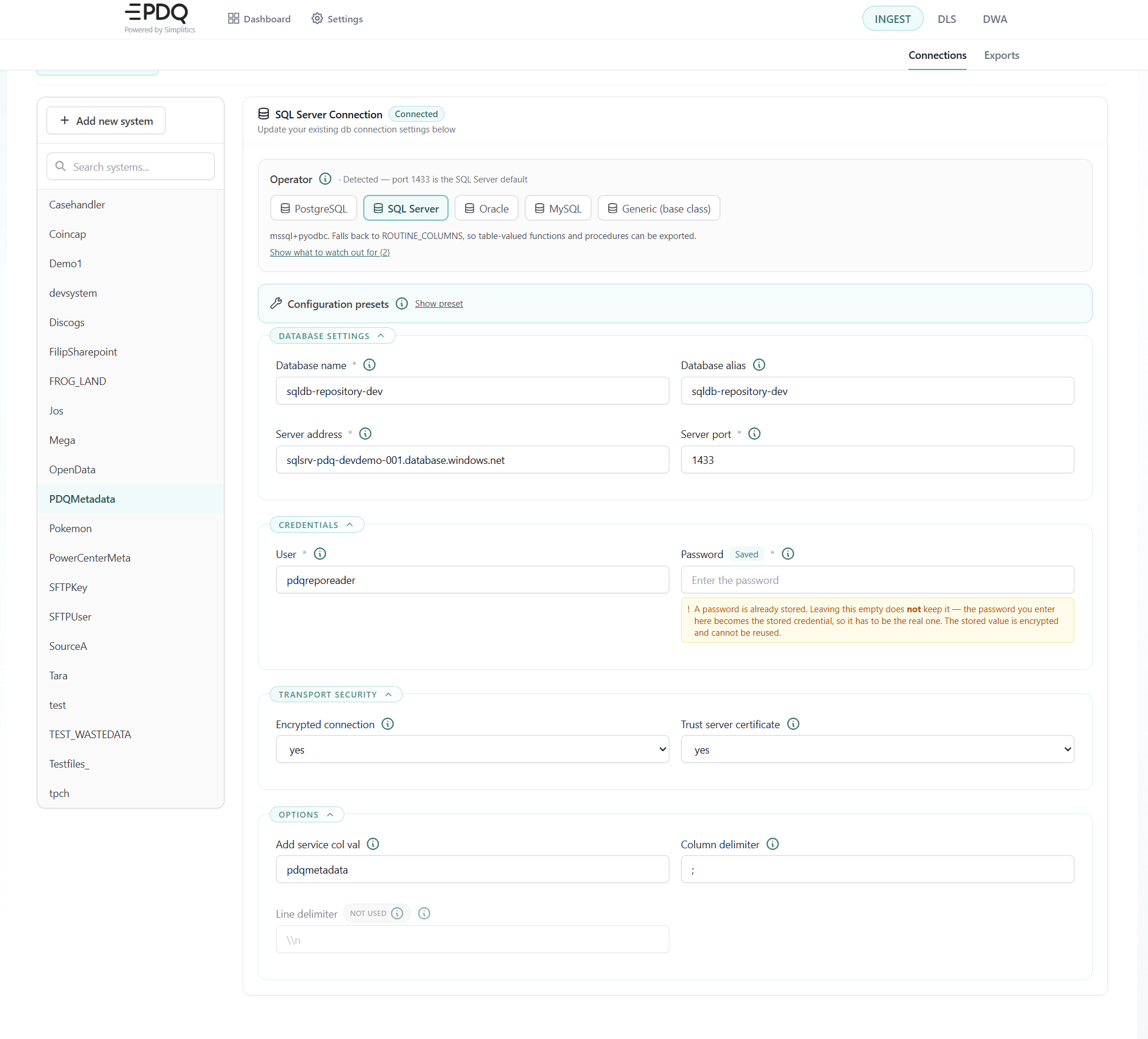
Database connection details
Database name (DBNm): The name of the database to connect to. Required. For Oracle this is the service name, not a schema — it is passed as service_name.
Database alias (DBAlias): Informational only. It is not used to reach the server.
Server address (DBServerAddr): Host name or IP of the database server. Required.
Server port (DBServerPort): The port the server listens on. Required. The form pre-fills the operator's default: 5432 for PostgreSQL, 1433 for SQL Server, 1521 for Oracle, 3306 for MySQL. This is also the value used to detect which database operator the connection runs.
User (DBUsr): The user name used to authenticate. Required.
Password (DBUsrPwd): The password for that user. Required, and never pre-filled — see Credentials above.
Encrypted connection (DBEncryptedConnection): yes asks for an encrypted connection to the server.
Trust server certificate (DBTrustCertificate): yes accepts the server's certificate without validating it — what an internal server with a self-signed certificate needs. On SQL Server this becomes TrustServerCertificate in the connection URL.
API connection details
- OAuth 2.0 — posts the connection properties to the token URL and builds the
Authorizationheader from the response. - Token — makes no network call and uses the
bearer_tokenconnection property directly. - Basic — behaves like OAuth when a token URL is set, and falls back to the bearer token when it is not.
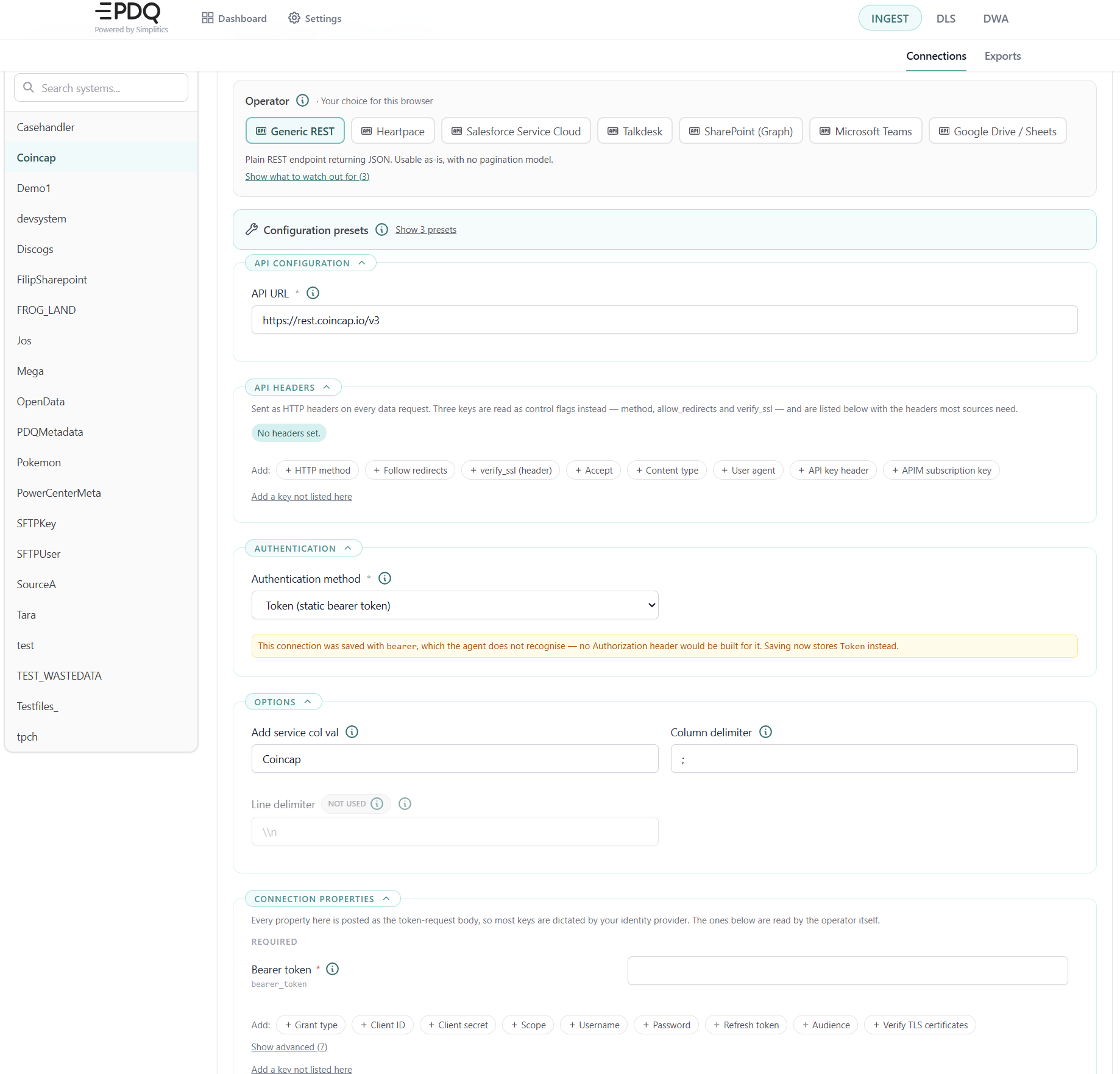
API URL (APIUrl): The base URL. Each export definition's API path is appended to it. Required.
Authentication method (APIAuthMethod): Decides everything else. The values the agent compares against are:
Connections saved by an older version of the UI may carry lowercase values (oauth, bearer, apikey, none) which the agent does not recognise — no Authorization header would have been built for them. The form flags this and stores the current spelling when you save.
Choosing OAuth 2.0 writes the properties that configuration requires into the property list, so the form and the saved payload agree.
Token URL (APITokenUrl): The endpoint the connection properties are posted to in exchange for an access token. Required for OAuth 2.0; optional for Basic, where leaving it empty falls back to a static bearer token.
API headers (APIHeader): Sent as HTTP headers on every data request, with three exceptions read as control flags:
| Key | Effect |
|---|---|
method | post sends the filter conditions as a JSON body; anything else sends a GET with query parameters. |
allow_redirects | Remove the key to stop following redirects. It is truthiness-tested, so the string false still enables them — delete the row instead. |
verify_ssl | Stripped from the token request only. It is still sent as a literal header on data requests; use the verify_ssl connection property instead. |
The headers most sources need are offered in the add menu — Accept, Content-Type, User-Agent, and X-API-Key for API-key authentication. Header names are not standardised, so check the provider's own spelling.
Connection properties (APIConnectionProperties): Posted as the token-request body, so most keys come from your identity provider rather than from the agent:
| Key | Used for |
|---|---|
grant_type | Which OAuth flow. client_credentials moves the client id and secret into an HTTP Basic header; password keeps everything in the body. Posted verbatim, so a provider-specific grant can be typed in. |
client_id / client_secret | The credential pair, for the client-credentials and password grants. |
username / password | The resource owner's credentials, for the password grant. |
refresh_token | The long-lived token, for the refresh-token grant. Only workable where the provider issues a non-rotating token. |
scope | What the token is allowed to reach. Required by some providers, optional for others. |
audience | Names the API the token is for. Auth0 requires it; without it the token comes back opaque and the source rejects it. |
assertion | The signed JWT, for the JWT-bearer grant. |
client_assertion / client_assertion_type | A signed JWT authenticating the client instead of a secret — Entra ID with a certificate, for one. |
resource | Required by some older identity providers. |
token_auth_method | Where the client credentials go, for providers that offer a choice. |
bearer_token | The static token, for authentication method Token. |
verify_ssl | Set false to disable TLS verification on every request. Exposes the connection to interception — only for a known-bad internal certificate. |
cert_file / key_file | Client certificate and key inside the container, for mutual TLS. |
Which of these are required follows the authentication method and the grant type, not the operator — a client secret is needed for a client-credentials exchange and meaningless for a static bearer token. The editor groups the required ones first.
Sources behind a gateway. If the source is fronted by a gateway (Azure API Management, for example), the vendor's own guidance stops applying: the scope, grant type and credentials become whatever the gateway expects. The form notices this from the token URL, withdraws the provider-specific suggestions and says why. Azure API Management usually also needs an Ocp-Apim-Subscription-Key header, which is offered on every API operator.
File connection details
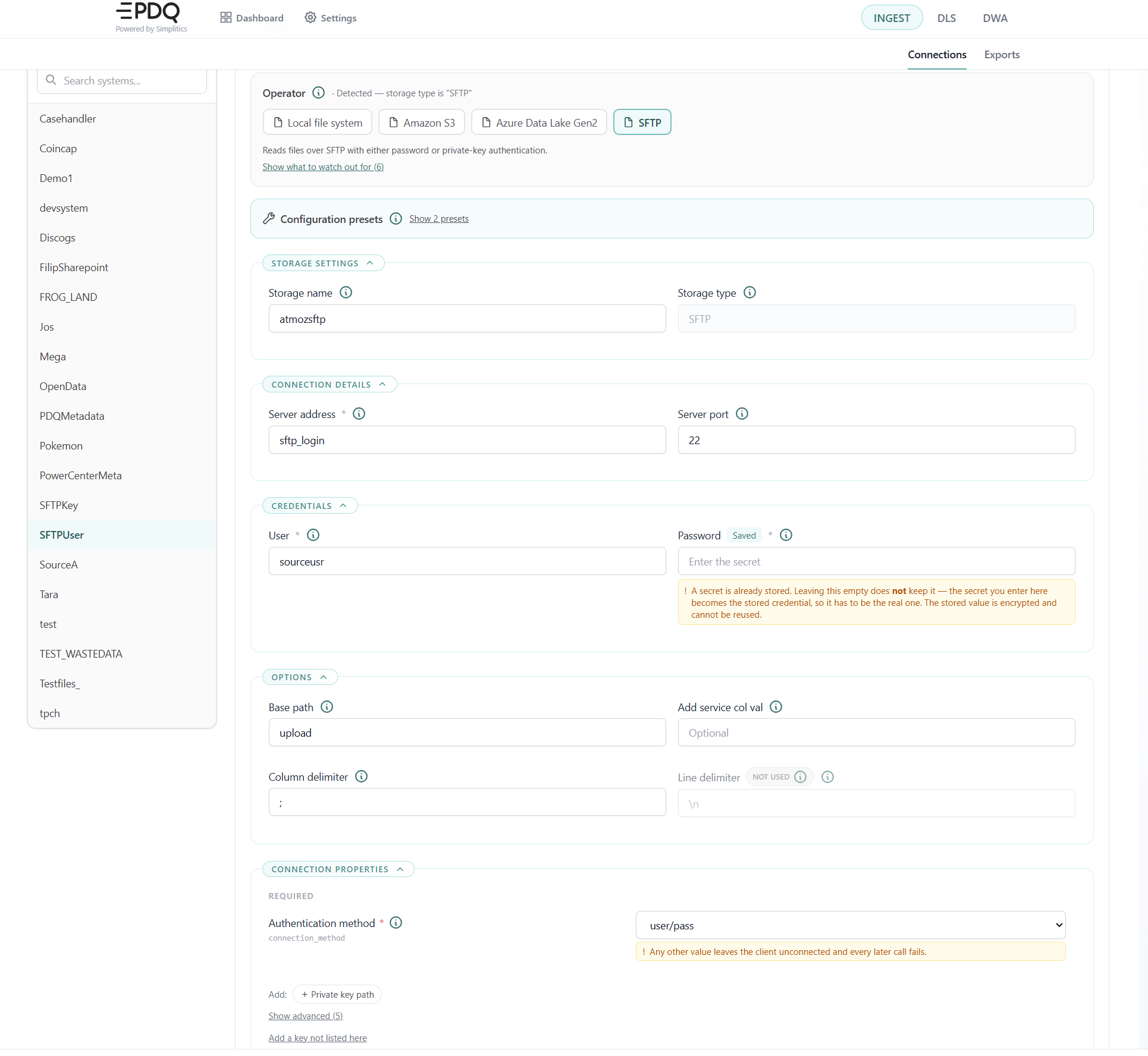
Storage name (StorageName): The bucket name for S3, the storage account for Azure Data Lake Gen2. Informational for SFTP and a local path.
Region (StorageRegion): The AWS region. Required for S3; not used elsewhere — the ADLS endpoint is derived from the account name.
Storage type (StorageType): Read-only. It carries the chosen operator, and is what the runtime and this page both read.
Server address / Server port (StorageServerAddr, StorageServerPort): SFTP only; the port defaults to 22. S3 and ADLS are addressed by region, bucket and account name rather than by host.
User / Password (StorageUsr, StorageUsrPwd): The meaning depends on the operator — the access key id and secret access key for S3, the login user and password (or key passphrase) for SFTP, and the account key or SAS credential for ADLS. For ADLS the user field must be non-empty or the client is never built, but the value itself is never used.
Base path (StorageBasePath): The root directory for a local path, the key prefix for S3, the Gen2 filesystem (container) name for ADLS. It is joined with the export definition's file path.
Connection properties (StorageConnectionProperties): SFTP requires connection_method (user/pass or private_ssh_id) and reads private_ssh_id_path. Every file operator also exposes performance tuning under Show advanced — fetch chunk memory, write batch size, gzip level, download chunk size.
Custom and queue connection details
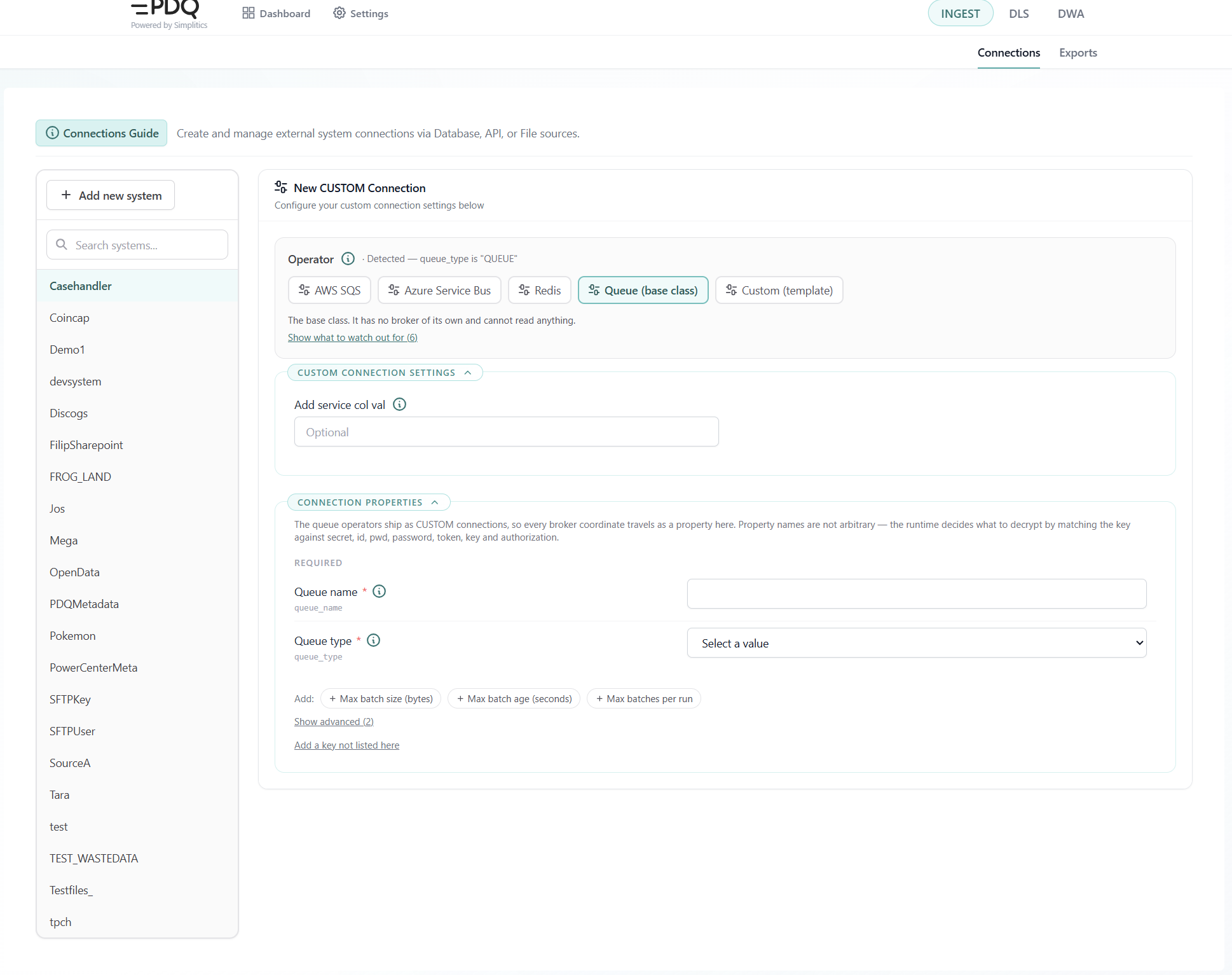
Queue connections ship as CUSTOM, so every coordinate travels as a key=value connection property.
Queue type (queue_type): SQS, SERVICEBUS or REDIS. This is how the page knows which broker you are configuring. Required.
Queue name (queue_name): SQS resolves the queue URL from this at connect; for Redis it is the stream or list key. Required.
Broker credentials are named to match the runtime's decryption rule, which works by substring match on the key — access_id, access_key and connection_token are decrypted, and every tunable is deliberately named to miss that rule. SQS needs region, access_id and access_key; Service Bus needs connection_token and, for a topic, topic_name and subscription_name; Redis takes either a connection_token URL or host/port/access_id/access_key/db, plus its consumer-group settings.
Batch bounds — max_batch_bytes (30 MB), max_batch_seconds (15 minutes), max_batches_per_run (0 = unlimited), receive_batch_size and receive_wait_seconds — decide when a batch file is closed. The first three can be overridden per export.
Options shared by every connection type
Add service col val (AddServiceColVal): When set, every exported record gets a __service column carrying this value.
Column delimiter (ColumnDelimiter): Field separator used when CDC writes CSV output. Ignored for JSON.
Line delimiter (LineDelimiter): Read but not honoured by most operators — they force \n regardless. The form marks it as Not used where that is the case.
Saving
Show JSON opens the exact payload that will be posted, with a download button. Add connection / Update connection saves it. Required fields, and the properties the chosen operator cannot run without, are validated before the request is sent, and any failure is reported next to the button.
Source export configuration
The INGEST → Exports page (/sourceexports) configures what each export reads and where it lands. Source export is the process of reading a specific table, endpoint, directory or queue and writing the result to the landing zone. A file is created there named from the Output file name, suffix and format fields.
Pick a system in the sidebar. If it has no connection yet, the page says so and links to the Connections page. The export form is shaped by the same operator registry as the connection form, so a field the operator ignores is shown with a Not used badge rather than removed.
Adding or editing a configuration
To edit an existing configuration, pick it from the Edit configuration dropdown. After making your changes, click Update configuration.
To add a new configuration, leave the dropdown empty — or click Reset/New to clear the form — fill it out, and click Add configuration.
After a successful save the page offers to create a matching source import (a DLS source file) prefilled from the export you just defined.
Settings shared by every export type
Change Data Capture (CDC) (enableCDC): Tracks changes in the source data. On (1) exports only new, deleted or changed records since the last run; off (0) exports everything every run. CDC compares each run against a baseline the agent keeps locally, in the file <alias>_latestversion.txt inside its own container. The baseline survives a restart, which is what the file is for. It does not survive the container being destroyed or removed: the next run then exports everything once and builds a new baseline. Queue exports bypass CDC entirely — leave it off there.
Output file name / Alias (alias): The file name stem used for the exported data, and the name downstream processes identify it by. Required.
Output format (outputFormat): json, csv or binary. For file-system sources, json and csv convert the files with DuckDB while binary uploads them untouched and skips CDC. The plain API operators always write newline-delimited JSON regardless of this setting, and the form says so.
Output file suffix (suffix): Appended to the file name. Either a literal string or a dynamic time value — see Dynamic time values below. Required.
Time token format (dateTimeFormat): The export-wide rendering used by any time value that does not carry its own AS segment. Defaults to TIMESTAMP, or DATETIME for database operators, which suits SQL literals. Any value that is not one of the named formats is treated as a literal pattern built from [YYYY] [YY] [MM] [DD] [HH] [MI] [SS].
Stop at row (stopAtRow): Early-stop limit; -1 is unlimited. What it counts differs per operator — chunks of 25,000 rows for a database, items for an API, whole files for a binary file export, messages across the run for a queue.
Field selection (inclColumns / exclColumns): The include list is an allow-list (* keeps everything) and the exclude list is applied after it, so deny wins. On database exports the include list is joined straight into the SELECT clause and supports aliases and expressions; the exclude list there does not remove columns — it only suppresses type coercion, so drop columns from the include list instead. The form marks this.
Substitutions (substitutions): Derived or defaulted columns, applied while exporting. Useful for null replacement and for masking sensitive data.
Schedule: Schedule cycle (scheduleCycle) is never, minute, hourly, daily or monthly — never disables the export without deleting it, and API exports offer never, hourly and daily. Intervals below 15 minutes are not recommended. Schedule cycle interval (scheduleCycleInterval) is how many of those units between runs. Do not start before (scheduleDoNotStartBeforeTime) is the earliest time of day the export may start, as HH:MM:SS.
Dynamic time values
- Hive is only valid for paths. It produces a directory path, not a timestamp, so it belongs in a file path and nowhere else. It cannot be used as the export-wide time token format.
HIVEandHIVE_PADDEDare not interchangeable. Which one finds your data depends on how the source wrote its partitions —month=8ormonth=08. The picker offers both side by side rather than hiding the padding behind a toggle.- A value the form does not recognise is kept verbatim and edited as text, flagged as unrecognised. Nothing is silently rewritten.
Export definitions can carry values the agent resolves at run time instead of fixed text. They are used for the output file suffix, the file path of a partitioned source, file names, API request parameters, SQL where clauses, and the ends of a file-selection window.
The UI never asks you to spell a token: it asks which moment, how far back from it, and what shape it takes, then shows the assembled value alongside a plain-English reading of it.
Grammar
[__<TIME>[_MINUS_<N>_<UNIT>][_AS_<FORMAT>]__]
<TIME> — which moment
| Token | Meaning |
|---|---|
EXECUTIONTIME | Now, in the agent's configured timezone. Moves with delays and retries. |
SCHEDULEDTIME | The slot this run belongs to. The same value however late the run starts, so a retry reads the same window. |
LASTEXECUTION | The previous successful run's scheduled time. 1900-01-01T00:00:00 on the first run, which reads everything. |
_MINUS_<N>_<UNIT> — how far back. <UNIT> is one of SECONDS, MINUTES, HOURS, DAYS, WEEKS. There is no _PLUS_: an export reads a window that has already happened, so the offset only goes backwards.
_AS_<FORMAT> — what shape it takes
| Format | Renders as |
|---|---|
TIMESTAMP | 2026-08-12T14:30:45 — the default for API, file, custom and queue sources |
DATETIME | 2026-08-12 14:30:45 — the default for database sources; suits SQL literals |
DATE | 2026-08-12 |
DATECOMPACT | 20260812 |
TIME | 14:30:45 |
ISO | 2026-08-12T14:30:45+0200 — carries the agent's UTC offset |
EPOCH | 1786537845 — seconds since 1970 |
EPOCHMS | 1786537845000 — milliseconds since 1970 |
HIVE | year=2026/month=8/day=13 — a partition path, not a datetime |
HIVE_PADDED | year=2026/month=08/day=13 — the same, two-digit month and day |
HIVE also accepts a grain and padding together, for example HIVE_DAY_PADDED.
Which format is used. Resolved in this order: the _AS_ segment on the value itself, then the export's Time token format, then the source's own default. A value with no _AS_ is not unformatted — it inherits, and the picker names the format it will inherit.
Rules worth knowing
Older spellings. Both are recognised and keep working; the form flags them and writes the current spelling if you edit the value.
| Written | Means |
|---|---|
[__LAST_N_DAYS__] | The same as [__EXECUTIONTIME_MINUS_N_DAYS__]. A documented shorthand. |
[__LASTEXECUTIONTIME__] | Intended as LASTEXECUTION. Written by an older version of the admin UI; the grammar does not list this name, so exports carrying it may never have resolved. Worth checking. |
A different thing: file timestamp format. [YYYY][MM][DD] in File timestamp format is not a dynamic value. It describes how a timestamp is spelled inside the source's own file names, so the agent can match them. The finest part present also sets the search granularity — [HH] searches hourly, [DD] daily, [MM] monthly, [YYYY] yearly — and the source is listed once per period, so a daily format across a year is 365 listing calls.
Database exports
- Where clause (
whereClause): Inserted verbatim, so it must include theWHEREkeyword. An incremental filter is appended withAND. Time tokens are substituted here. - SQL override (
sqlOverride): Replaces the generated query entirely — useful for sub-queries and joins when you cannot create views or procedures in the source. Time tokens are still substituted, but the incremental filter is not appended, so build it into the override yourself.
Database name (databaseName): Read-only. Taken from the connection.
From clause (fromClause): The table, function, view or procedure to build the SQL query against, except when using sqlOverride. Required, and it must be schema-qualified (dbo.Customers) — the metadata lookup splits on the dot, so a name without one fails the run.
Included tables (inclTables): Extra tables whose column metadata is gathered for type coercion. Defaults to the from clause.
SQL query: A toggle chooses between the generated query and a full override.
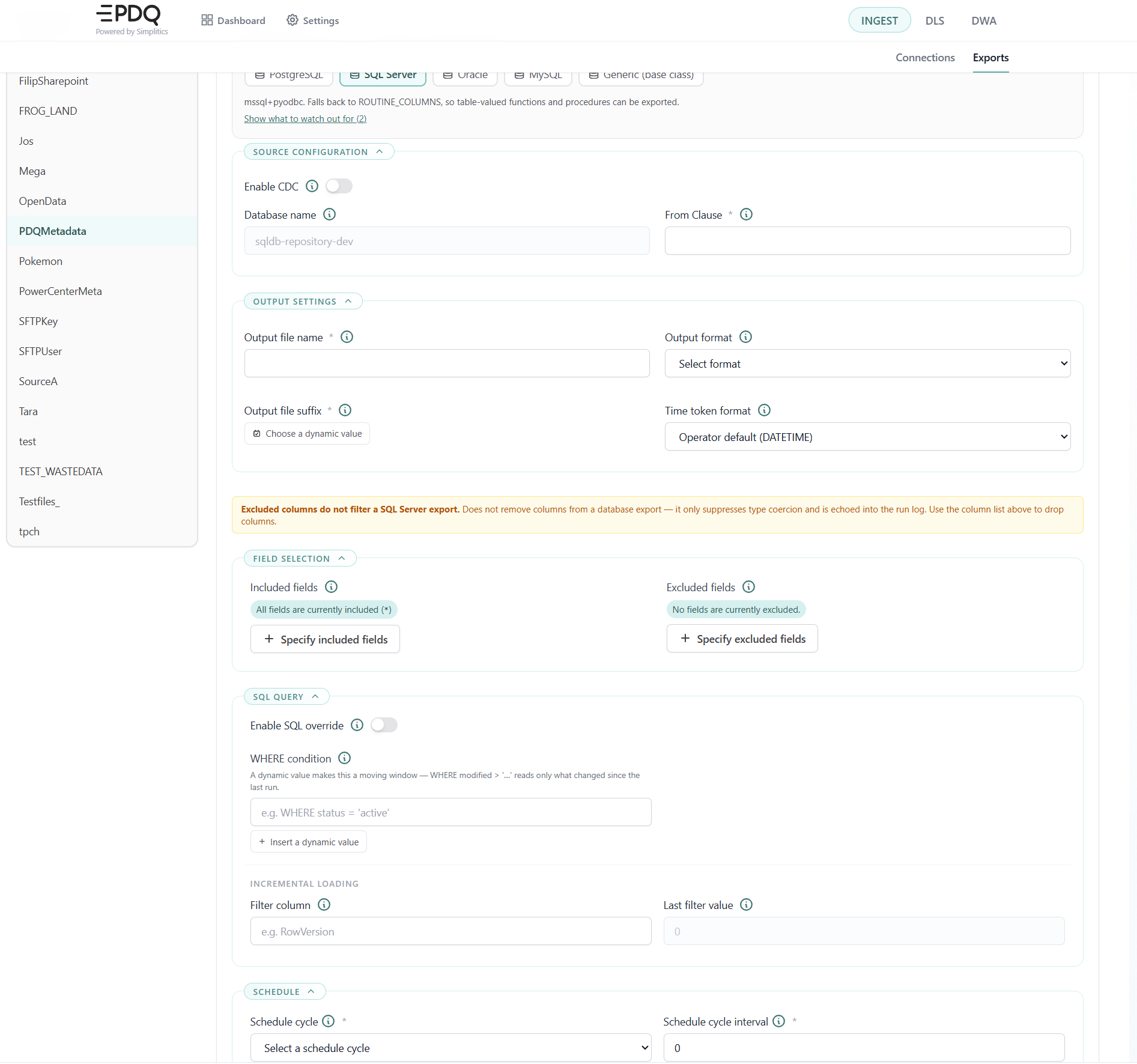
Filter column (filterColumn): Enables incremental loading. The comparison is numeric, so the column must be an increasing number.
Last filter value (lastFilterValue): The watermark from the previous run, posted back after each run. 0 on the first run.
API exports
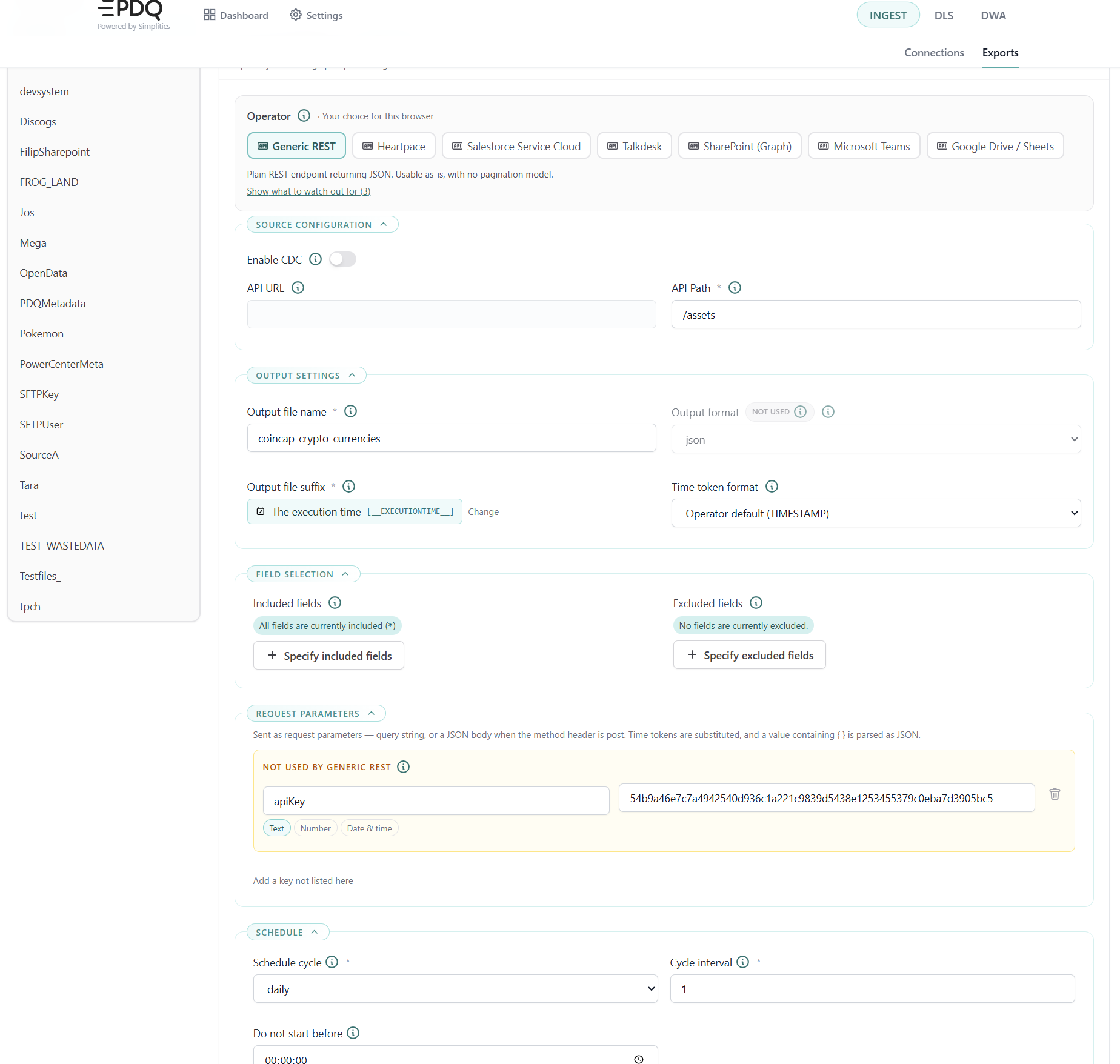
API URL (apiUrl): Read-only. Taken from the connection.
API path (apiPath): The route appended to the connection's API URL, for example /api/v1/data/export. Required.
Request parameters (filterCondition): Sent as request parameters — a query string, or a JSON body when the method header is post. Time tokens are substituted, and a value containing braces is parsed as JSON.
Parameters you define yourself hold Text, a Number, or a Date & time. The kind is inferred from the value and offered as a switch; it picks the editing control and nothing else. Date & time is where dynamic values belong — a moving window that follows the schedule rather than a date that has to be edited by hand.
File exports
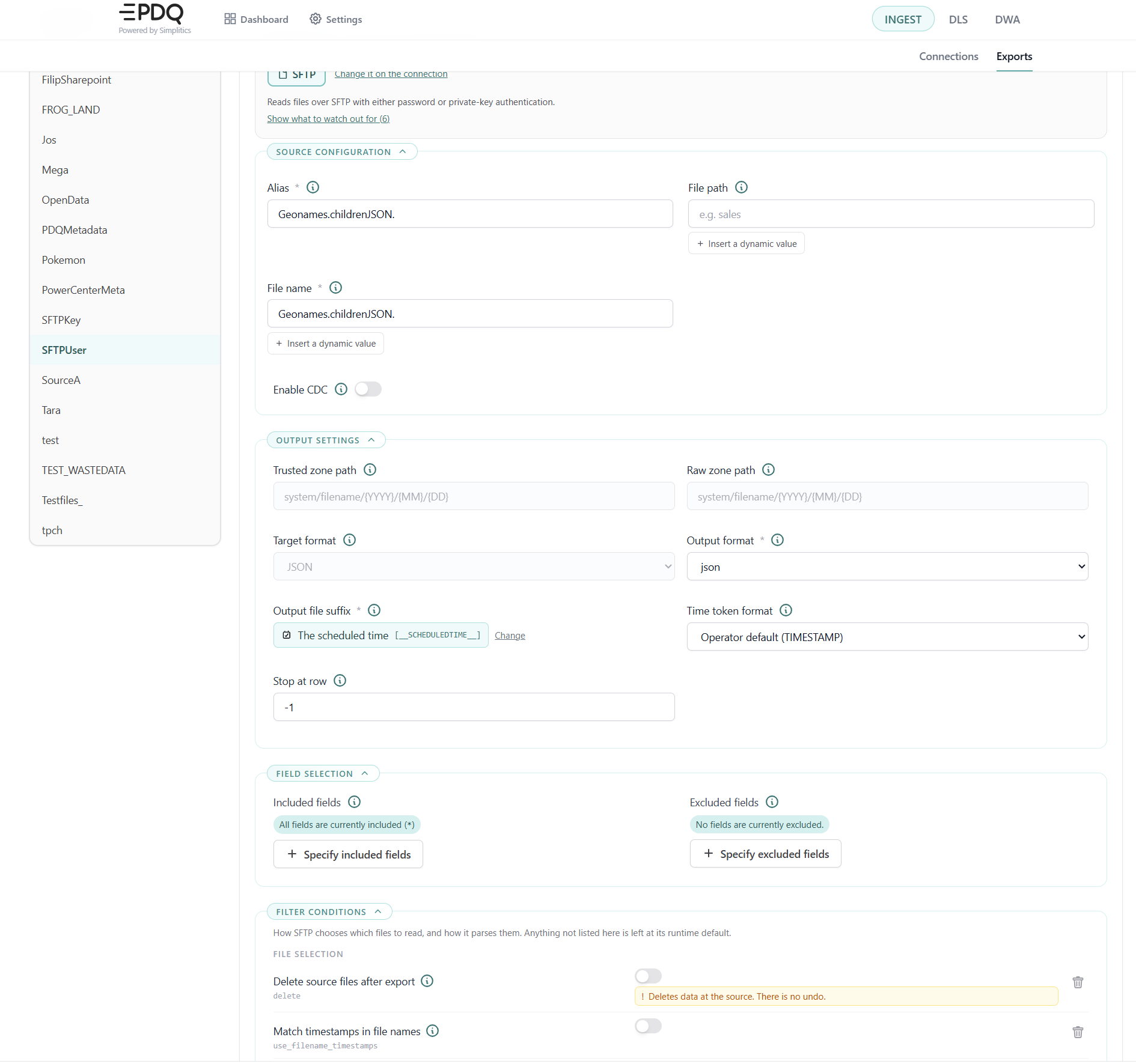
File path (filePath): Directory prefix, appended to the connection's base path. Time tokens are substituted, so a partitioned source can be addressed with [SCHEDULEDTIME_AS_HIVE].
File name (fileName): A substring match against the file name — not a glob. Required.
Trusted zone path, Raw zone path and Target format are shown read-only; they are managed in Settings.
Filter conditions (filterCondition) select which files are read and, through the reader keys below, how they are parsed.
File selection keys
| Key | Default | Description |
|---|---|---|
delete | false | Remove source files after a successful copy. There is no undo. |
use_filename_timestamps | false | true matches the timestamp in the file name; false filters on last-modified time. |
file_timestamp_format | [YYYY][MM][DD] | Timestamp pattern inside file names. The finest part present also sets the search granularity. |
start_timestamp / end_timestamp | now | ISO datetime bounds of the selection window. Accepts dynamic time values. |
find_partitions | false | Amazon S3 only. Lists sub-prefixes under the base path and searches each. |
Reader keys — how the matched files get parsed. Format is detected in the order .xlsx → .parquet → JSON → CSV; a file matching none of them falls back to a binary copy. All matched files are read in one pass, so they must share a schema unless json_union_by_name covers the difference. Parquet takes no reader keys — it is always read as-is.
| Key | Applies to | Default | Description |
|---|---|---|---|
excel_sheet | Excel | – | Sheet name to read. |
excel_range | Excel | – | Cell range to read, e.g. A1:F100. |
file_encoding | CSV | utf-8 | Text encoding of the file. |
csv_has_header | CSV | true | First row is treated as the header. |
csv_sample_size | CSV | 10000 | Rows sampled for type and dialect detection. |
csv_delimiter | CSV | auto-detected | Field delimiter, e.g. ; or \t. Leave unset to let DuckDB's auto_detect work it out. |
csv_quote | CSV | auto-detected | Quote character wrapping fields. |
csv_escape | CSV | auto-detected | Escape character used inside quoted fields. |
csv_comment | CSV | auto-detected | Lines starting with this character are skipped. |
csv_decimal_separator | CSV | auto-detected | Decimal separator, e.g. , for European number formats. |
csv_null_string | CSV | auto-detected | String value read as NULL, e.g. NA or \N. |
csv_skip_rows | CSV | 0 | Number of rows to skip before the header, e.g. to skip a banner row above it. |
json_sample_size | JSON | 10000 | Rows sampled for schema inference. |
json_format | JSON | auto | auto, newline_delimited, array, or another DuckDB JSON format. |
json_union_by_name | JSON | true | Union schemas across files instead of requiring identical ones. |
Every CSV key above is optional: only the ones explicitly set here are passed to DuckDB, and auto_detect decides anything left unset.
Custom and queue exports
Queue exports carry no source coordinates of their own — the queue is on the connection. One run drains the queue into one or more batch files named <alias>_<suffix>_batch<NNNNNN>.txt and then ends; an empty queue writes nothing at all.
Filter conditions here override the three batch bounds for this export only: max_batch_bytes, max_batch_seconds and max_batches_per_run.
Delivery is at-least-once — acknowledgement happens after fsync, per receive batch — and malformed messages are forwarded with a __parseError marker rather than left on the queue as poison.
Setting up a new database ingestion flow (code)
Setting up a new database ingestion flow involves several key steps to ensure data is accurately and efficiently extracted from your source database and loaded into your target system. Follow the steps below to configure and initiate a new database ingestion flow.
Extracting Data from an Internal Database and Writing the Content to the Data Platform
A step-by-step guide for automating the "pull data pattern." This involves extracting and loading data into the landing bucket on a scheduled basis. We need a reliable method to extract data from databases, APIs, file systems or queues on a fixed schedule.
To set up a new data export, you need to create an instruction JSON. Each export must be linked to a pre-defined source connection.
First, check for Existing Source Connection:
Is there an existing source connection?
Yes: Skip to Step 2.
No: Follow Step 1.
Step 1: Define a New Source Connection
Create a JSON definition using the following template:
{
    "Type": "DB",
    "DB": {
        "sourceSystem": "NewSystemName",
        "DBNm": "databaseName",
        "DBAlias": "AliasForInternalReference",
        "DBServerAddr": "databaseserver.at.hostname.com",
        "DBServerPort": "5432",
        "DBUsr": "UserName",
        "DBUsrPwd": "EncryptedString",
        "DBEncryptedConnection": "yes",
        "DBTrustCertificate": "no",
        "AddServiceColVal": "",
        "ColumnDelimiter": "|",
        "LineDelimiter": "\\n"
    }
}
Database Connection Parameters Description
Type: The connection kind. One of DB, API, FILE or CUSTOM. Which database flavour the agent uses is configured assourcetypein the agent's ownsettings.yaml, not here — PostgreSQL, SQL Server, Oracle and MySQL are supported.
DB: The object carrying the database connection fields.
sourceSystem: A name that binds the connection to an internal reference. Ideally, this should be the same as the source system name used in other references within PDQ.
DBNm: The name of the database you want to connect to. For Oracle this is the service name.
DBAlias: Informational only — it is not used to reach the server.
DBServerAddr: The server address required for the connection.
DBServerPort: The port number of the database server. 5432 PostgreSQL, 1433 SQL Server, 1521 Oracle, 3306 MySQL.
DBUsr: The username used for the connection.
DBUsrPwd: The password used for the connection. This must be encrypted before posting to the API. To encrypt the password, use the encryption endpoint and paste the returned hash as the password. Note that the API encrypts whatever it receives, so never post back a value that is already encrypted — it would be encrypted twice and the connection would fail at the next export.
DBEncryptedConnection:yesasks for an encrypted connection to the server.
DBTrustCertificate:yesaccepts the server's certificate without validating it — what an internal server with a self-signed certificate needs. On SQL Server this becomesTrustServerCertificate.
AddServiceColVal: (Optional) If provided, adds a__servicecolumn to each row containing the specified value.
ColumnDelimiter: The field separator used when CDC writes CSV output. Ignored for JSON.
LineDelimiter: Read but not honoured by most operators — they force\n.
Upload the definition to INGEST:
- Use the API definition in swagger:
/api/v3/ingest/connection/for/:sourceSystem. - Replace
:sourceSystemwith the name you provided. For example, if your source system name isNewSystemName, the endpoint will be/api/v3/ingest/connection/for/NewSystemName.
Step 2: Define a New Source Export
Construct a JSON definition using the following template:
{
    "sourceSystem": "NewSystemName",
    "databaseName": "databaseName",
    "fromClause": "schema.main-table-or-view",
    "inclTables": [
        "schema.table1",
        "schema.table2"
    ],
    "alias": "NewSystemName.main-table-or-view",
    "suffix": "[__SCHEDULEDTIME__]",
    "dateTimeFormat": "DATETIME",
    "outputFormat": "json",
    "inclColumns": [
        "*"
    ],
    "exclColumns": [],
    "whereClause": "",
    "sqlOverride": "",
    "filterColumn": "",
    "lastFilterValue": "",
    "stopAtRow": -1,
    "substitutions": [],
    "enableCDC": 0,
    "scheduleCycle": "daily",
    "scheduleCycleInterval": 1,
    "scheduleDoNotStartBeforeTime": "02:00:00"
}
Database Export Parameters
sourceSystem: A name that binds the connection to an internal reference. Ideally, this should be the same as the source system name used in other references within PDQ.
databaseName: The name of the database you want to connect to.
fromClause: Specifies the table, function, view or procedure to build a SQL query against, except when usingsqlOverride. It must be schema-qualified — the metadata lookup splits on the dot.
inclTables: A list of all tables from which data is exported. This ensures data is extracted using the correct data types. An empty list defaults to the from clause. Use it to list every object behind a view or procedure, so column types are resolved correctly.
alias: The filename used for the exported data. This is used by downstream processes to identify the data and is loosely connected to thefilenamePatternin the DLS source file definition. Note that it is possible to write several different exports to a single DLS source file. It is also the stem of the CDC baseline file,<alias>_latestversion.txt.
suffix: Appends information to the written filename. It accepts a literal string or a dynamic time value:
[EXECUTIONTIME]: Now, in the agent's configured timezone.[SCHEDULEDTIME]: The slot this run belongs to. Late executions append the planned scheduled timestamp, not the actual execution timestamp.[LASTEXECUTION]: The previous successful run's scheduled time. Useful for describing the oldest possible data in the export.Each accepts an optional
MINUS<N>_<UNIT>offset and an optionalAS<FORMAT>rendering — for example[SCHEDULEDTIME_MINUS_1_DAYS_AS_DATE]. There is noPLUS. See Dynamic time values on the Exports tab for the full grammar.
dateTimeFormat: The export-wide rendering used by any time value that does not carry its ownASsegment.DATETIMEfor database sources,TIMESTAMPelsewhere. Any other value is treated as a literal pattern built from[YYYY] [YY] [MM] [DD] [HH] [MI] [SS].
outputFormat:json,csvorbinary.
inclColumns: Lists the columns to be included in the exported file. You can use an alias syntax in the list, for example,["Id as fileId", "text as description"]. It is also possible to use column computations in valid SQL syntax, for example,["Id", "CASE WHEN col1 = 'A' THEN true ELSE false END AS HasAValue"]. Use*to include all available columns.
exclColumns: On a database export this does not remove columns — it only suppresses type coercion and is echoed into the run log. Drop columns frominclColumnsinstead. On API, file and queue exports it is a genuine deny-list applied after the allow-list.
whereClause: Adds filtering to the export query. It is inserted verbatim, so it must include theWHEREkeyword, and an incremental filter is appended withAND. Use native column names to prevent SQL errors. Dynamic time values are substituted here, so this is how you export only what changed since the last run:WHERE MyDatabaseLoadingTimestampColumn > '[__LASTEXECUTION__]'sqlOverride: Overrides the generated SQL based on the attributes above. Instead, it runs the SQL provided here. This is useful for sub-queries and joins when you cannot create views, functions, or procedures in the source. Dynamic time values also apply to
sqlOverride, but the incremental filter is not appended — build it in yourself.
filterColumn: Enables incremental loading. The comparison is numeric, so the column must be an increasing number.
lastFilterValue: The watermark from the previous run, posted back to AME after each run.0on the first run.
stopAtRow: Defaults to -1, meaning the process will read all data supplied by the query. If a positive integer is provided, the process will stop when the row count reaches that value. Note that the database operators count chunks of 25,000 rows rather than individual rows.
substitutions: Transforms data on the fly while exporting. This is useful for null replacements and handling some sensitive data. It is formatted to work with the Python transform function. Here are two different use cases:[
{
"column": "customerId",
"type": "null",
"replace": ""
},
{
"column": "SSN",
"replace": " str(SSN)[:4] if len(str(SSN)) == 12 else '' ",
"alias": "birthYear",
"type": "transform"
}
]The
replaceexpression is evaluated witheval()— treat export definitions as trusted code.
enableCDC: 1 means enabled, 0 means disabled.enableCDC = 1will enable row by row change data capture, comparing all column values against the last exported row. Only new, deleted or changed records will be exported. The agent keeps the baseline locally, in the file<alias>_latestversion.txtinside its own container, so the comparison survives a restart — that is what the file is for. It does not survive the container being destroyed or removed: the next run then exports everything once and builds a new baseline. Combining enableCDC = 1 with dynamic filtering in the whereClause will report rows the filter excluded as deletes. Use one or the other.
scheduleCycleInterval: An integer value (e.g., 1) that determines the frequency of the schedule. The scheduler will increment based on this value in conjunction with thescheduleCycletype.
scheduleCycle: Specifies the type of schedule for running the export. Possible values include:
- never — the export stays defined but is not scheduled
- minute
- hourly
- daily
- monthly
This determines the unit of time used to increment thescheduleCycleIntervalfrom thescheduleDoNotStartBeforeTime.
scheduleDoNotStartBeforeTime: The starting point for any increment, represented as HH:MM:SS. For example,02:00:00means the increment starts from 2 AM. IfscheduleCycleis set tohourlyandscheduleCycleIntervalis set to2, the export will run every 2 hours starting from 2 AM.
Upload the definition to INGEST:
- Use the API definition in Swagger:
/api/v3.1/ingest/definition/for/:sourceSystem/:alias.
Step 3: Validate
If the ingestion container is running for the specified sourceSystem connection, the newly defined export will execute at its next scheduled time, provided that the scheduleDoNotStartBeforeTime for today has passed. The data will be loaded into the previously defined datastore, which in this case is the landing bucket. To verify the data, log in to your Cloud account and check the landing bucket.
Installation of INGEST agent
Start a new Docker container with the sourceSystem as a runtime parameter. The container will use the supplied connection and execute all attached instructions according to the provided batch schedule. Please consult the environment setup guide for detailed instructions on how to initiate the Docker container.
Technical Specifications
INGEST
Runs as a container (1 per source connection). Built using Docker. Python 3.12 on Debian 12. Code is hosted in Bitbucket, and containers are published on Docker Hub.
The agent picks one operator class per source system, configured as sourcetype in its settings.yaml. Each operator reads a different subset of the connection fields, connection properties, export fields and filter conditions; the Config UI derives its forms from the same registry.
Python Requirements.txt
requestspyodbcsqlalchemypandaspytzoauth2clientpyyamlpsycopg2msrestazureazure-commonazure-storage-blobazure-storage-commonazure-storage-file-datalakeazure-datalake-storeboto3duckdb
Operator notes worth knowing
- Databases stream a SQL query through pandas in chunks. The chunk size is fixed at 25,000 rows, and a
__checksumcolumn is added per record, which enables the fast CDC path. Oracle needs the Oracle instant client, so it runs in the container only. MySQL uses a server-side cursor, so large tables do not materialise in memory. - APIs retry once after a single token refresh on a 401. A 404, any status at or above 400, and an undetectable response Content-Type all fail the workload.
- File systems detect the format in the order .xlsx, .parquet, JSON, CSV, each probed with a LIMIT; undetectable files fall back to a binary copy. All matched files are read in one pass, so they must share a schema or rely on union by name. DuckDB is capped at 2 threads and a 2 GB memory limit.
- Queues drain into batch files and then end, rather than looping. Delivery is at-least-once, and this family targets small messages — land large payloads in blob storage and ingest them with a file-system operator.
An SFTP source accepts whatever host key the server presents, so the server's identity is never verified and a redirected connection would not be detected. Restrict the network path to the SFTP host, and treat the transport as confidential but not authenticated. The network posture this depends on is in Installing and securing the platform.
Deployment and Execution
- This application can be run on any container-based environment. While it is preferable to run it close to the data source, it is not a strict requirement.
- The application does not generate code. Instead, it uses JSON-based configuration as input and outputs data to the defined output platform.